Curiosity and a computer.
That's all you need to start.

You're about to learn how to build real software — apps, games, tools — using AI that writes the code for you. No experience required. Just follow the steps below.

Already built your own PC? Done video editing? Managed a team? Those are real skills — problem-solving, troubleshooting, creative thinking. You're more ready than you think.

Get Started

Getting Set Up

Everything you need to start building. Takes about 10 minutes.

1

Sign Up for Claude Pro

Use this referral link to sign up and get a free trial of Claude Pro. Pro includes Claude Code and gives you access to Opus, the most capable model. This is all you need to pay for — no separate API keys or billing.

2

Install Node.js

Download the LTS version (the big green button) from nodejs.org. Run the installer and accept all defaults. This gives you the tools needed to install Claude Code.

3

Install Git for Windows

Download from git-scm.com and run the installer with all defaults. Claude Code needs Git to work properly on Windows. Git also includes Git Bash, which gives you a proper terminal.

4

Install uv (Python Package Manager)

uv is a fast Python package manager you'll need for Level 2+ projects. Open PowerShell and run:

powershell -ExecutionPolicy ByPass -c "irm https://astral.sh/uv/install.ps1 | iex"

uv replaces pip and conda — it's faster and simpler. When a project needs Python packages, you'll use uv instead of pip.

5

Install Claude Code

Open PowerShell or Windows Terminal and run:

npm install -g @anthropic-ai/claude-code

This installs Claude Code globally on your computer so you can use it from any folder.

6

Log In and Verify

Run claude in your terminal. It will open your browser to log in with your Claude Pro account. Once logged in, you're good to go.

claude
7

Set Opus as Your Default Model

Always use Opus. It's the most capable model and gets things right the first time. Sonnet is cheaper but tends to go in circles on anything complex. Set Opus as your default:

claude config set model claude-opus-4-6

Or type /model inside Claude Code and select Opus.

Full documentation: Claude Code Docs

Troubleshooting

PowerShell says "not recognized" when I run npm or claude

This usually means Node.js didn't get added to your PATH. Close PowerShell completely, reopen it, and try again. If it still doesn't work, uninstall Node.js, restart your computer, then reinstall it.

Permission denied during npm install

Try running PowerShell as Administrator: right-click PowerShell in the Start menu and choose "Run as administrator." Then run the install command again:

npm install -g @anthropic-ai/claude-code
Browser login isn't working / "Authentication error"

Make sure you signed up for Claude Pro at claude.ai (not just a free account). If the browser doesn't open automatically, copy the URL from the terminal and paste it into your browser. If you're still stuck, try running claude logout then claude again to restart the login flow.

Claude Code is taking a long time

This is normal. Claude Code thinks carefully about your request, reads files, writes code, and tests it — all before responding. Complex tasks can take a few minutes. Be patient and let it work. If it seems truly stuck (5+ minutes with no progress), you can press Ctrl+C to cancel and try rephrasing your request.

uv command not found

Close PowerShell and reopen it after installing uv. If it still doesn't work, try the manual install from docs.astral.sh/uv.

Still stuck?

Text or call: (775) 393-9865

Or check the Claude Code docs and Anthropic Discord community.

Your First Project

Build a working app in about 15 minutes. Claude Code walks you through every step.

Clone the Repo and Let Claude Guide You

We've set up starter projects with instructions already built in. You clone the repo, pick a project, and Claude Code walks you through building it — step by step, at your pace.

1

Clone the repo

Open PowerShell and run:

git clone https://github.com/jabelk/ai-career-launchpad.git
2

Pick a starter project

Navigate into one of the starter projects. We recommend starting here:

cd ai-career-launchpad/starter-projects/re-enemy-wiki

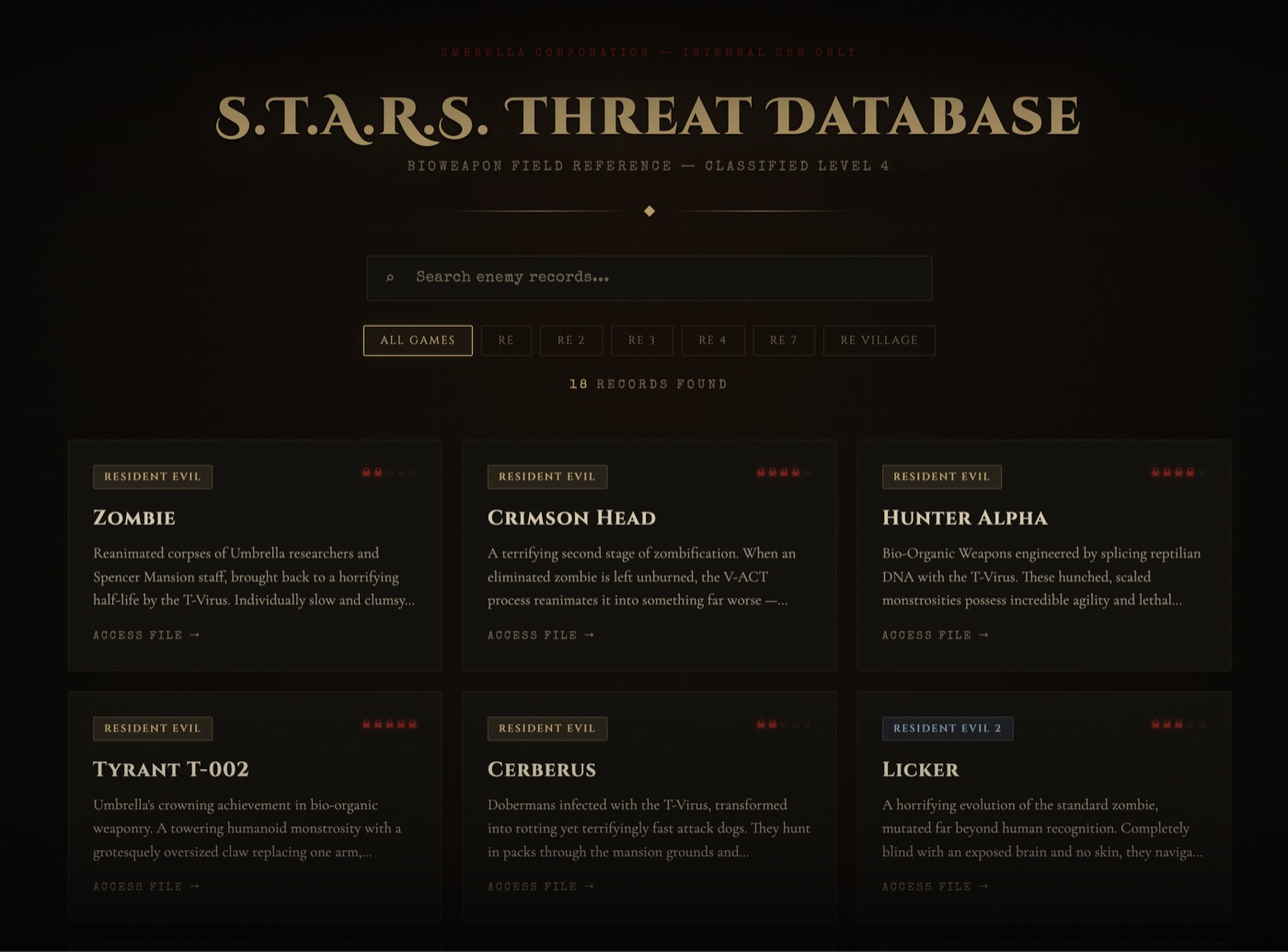
This builds a searchable Resident Evil enemy database — horror-themed, with stats and combat tips for every creature.

3

Run Claude Code

Just type:

claude

Claude Code reads the project files automatically, introduces itself, explains what you're about to build, and starts walking you through it. You don't need to type a detailed prompt — just follow along and make decisions as it asks.

4

Build, preview, iterate

Claude Code builds your project in stages. After each milestone, it pauses to show you what it made and asks if you want to continue. Open index.html in your browser to see your app come together.

Here's what the RE Enemy Wiki looks like when it's built:

Screenshot of the RE Enemy Wiki — a dark, horror-themed web page showing Resident Evil enemies in a card layout with search and game filters

Your results may look different — Claude Code generates unique designs each time. That's part of the fun.

Other Starter Projects

After your first project, try these:

Stream Overlay Generator Level 1

Build custom OBS overlays — starting soon screens, BRB screens, webcam frames, countdown timers.

cd starter-projects/stream-overlay

AI Game Review Writer Level 2

A Python tool that takes your rough game notes and turns them into polished reviews using AI. Introduces Python and API integration.

cd starter-projects/ai-game-reviewer

Tips for Working with Claude Code

Be patient. Claude Code reads your files, thinks about the problem, writes code, and sometimes runs it — all before responding. A complex request can take a few minutes. This is normal. Let it cook.

Be specific. The more detail you give, the better the result. Instead of "make it look cool," try "add a dark background with red accents, a horror font for headings, and a subtle fog animation in the header." Claude Code takes instructions literally — so say exactly what you want.

Iterate in small steps. Don't ask for 10 things at once. Ask for one feature, review it, then ask for the next. This gives you better results and lets you catch issues early.

Learn more about prompting Claude Code effectively:

Don't want to clone? Try the manual approach

If you don't want to clone the repo, you can build the same project manually:

  1. Create a folder: mkdir re-enemy-wiki && cd re-enemy-wiki
  2. Run claude
  3. Type this prompt:
Build me a Resident Evil enemy database web app. I want a dark, horror-themed page with a searchable list of enemies from all the main RE games. Each enemy should have a name, the game it appears in, a danger rating (1-5 stars), a description of the enemy, and combat tips. Make it look like something from the Spencer Mansion. Add at least 15 enemies.

This works, but the clone approach gives you a better experience — Claude Code will walk you through everything step by step instead of generating it all at once.

Starting a New Project

Every new project gets its own folder. Here's the pattern.

The Three-Step Pattern

Every time you want to build something new, follow these steps:

  1. Create a new folder for your project: mkdir my-new-project
  2. Navigate into it: cd my-new-project
  3. Start Claude Code: claude

That's it. Describe what you want, and Claude Code builds it in that folder.

Important: Don't keep building everything in your first project's folder. Each project gets its own directory. This keeps your work organized and lets Claude Code focus on one thing at a time.

Spec-Driven Development

Before you build, write down what you want. This one habit will make you 10x more effective.

Professional developers don't just start coding — they write a plan first. It's called a "spec" (short for specification). It sounds fancy, but it's really just answering four questions before you start building.

Here's a simple template you can copy and paste into any project:

## What I Want to Build [One sentence describing your project] ## Who Is It For [Me / my friends / my stream viewers / the internet] ## What It Should Do - [Feature 1] - [Feature 2] - [Feature 3] ## What "Done" Looks Like [How will I know it's finished and working?]

Save this as a file called spec.md in your project folder. When you start Claude Code, it will read the spec and know exactly what to build.

Set Up Spec Kit Tooling

Want even more structure? Install GitHub Spec Kit — it adds slash commands to Claude Code for creating specs, plans, and tasks automatically. Run this in your project folder:

uvx --from git+https://github.com/github/spec-kit.git specify init my-project

Say yes to the prompts and it will set everything up. Important: If you run this from inside Claude Code, you need to exit Claude Code (/exit) and reopen it for the new slash commands to load. Then you can use /speckit.specify, /speckit.plan, and more to structure your projects like a pro.

Learn More About SDD

SDD Practical Guide — The full guide to spec-driven development.

GitHub Spec Kit — GitHub's official SDD toolkit.

Learning Path

A week-by-week plan to go from beginner to building real AI projects. All free unless noted.

Week 1 — Orientation (What Is This AI Stuff?)

The 5 Techniques Separating Top Agentic Engineers Right Now

Cole Medin — The big picture of what AI engineers actually do.

~15 min Watch

Every RAG Strategy Explained in 13 Minutes

Cole Medin — Understand how AI apps retrieve and use information.

~13 min Watch

The Way We Use AI Will Completely Change in 2026

Cole Medin — Where AI is headed and why now is the time to start.

~16 min Watch

Week 2 — Claude Code Fundamentals

Context Engineering 101: The Simple Strategy to 100x AI Coding

Cole Medin — How to give AI the right context for better results.

~15-20 min Watch

Code 100x Faster with AI, Here's How (No Hype, FULL Process)

Cole Medin — 145K views. Real workflow, no fluff.

~20-30 min Watch

Context Engineering Intro Repo

Cole Medin — Clone this repo and read the templates to understand project structure.

Repo Clone

Week 3 — Practical Claude Code

Everything You Need to Know to Crush Building Anything with Claude Code

Cole Medin — Global rules, slash commands, MCP servers, subagents, hooks.

~30-40 min Watch

Week 4 — AI Agents Foundation

Learn 90% of Building AI Agents in 30 Minutes

Cole Medin — 26K views. Your crash course on AI agents.

~30 min Watch

AI Agents Masterclass

Cole Medin — Start from lesson 1. Build real AI agents step by step.

Course Start

Week 5+ — n8n and No-Code Automation

RAG AI Agent with n8n + Supabase

Cole Medin — 194K views. Highest-viewed n8n tutorial on YouTube.

~15-25 min Watch

Paid Course Option

Dynamous AI — Cole Medin's community and courses for agentic coding. Structured curriculum with community support.

Free Certifications

Google AI Essentials — The most popular Coursera course ever. Free with financial aid (150-word application).

Google AI Professional Certificate — 7 courses + capstone, hands-on with Gemini. Free with financial aid or .edu email.

Google Career Certificates — IT Support, Data Analytics, UX Design — all no-experience, free with financial aid.

Project Ideas

9 projects organized by difficulty. Start with Level 1 and work your way up.

Level 1 Zero Code Knowledge — Claude Code Does Everything

RE Enemy Wiki

A searchable database of Resident Evil enemies with stats, images, and lore from every game in the series.

You already know the domain. Pure fun, zero friction.

HTMLCSSJavaScript

Stream Overlay Generator

Custom OBS overlays with countdown timers, subscriber alerts, and animated transitions for your stream.

Directly useful for your streaming setup.

HTMLCSSJavaScript

Video Clip Organizer

Tag and search your gaming clips by game, date, and rating. Never lose a sick clip again.

Solves a real problem for content creators.

HTMLCSSJavaScriptLocal Storage

Level 2 Intro to AI Integration — API Calls and Prompts

AI Game Review Writer

Paste your game notes, get a polished review written in your personal style. Perfect for YouTube descriptions or blog posts.

Combines your gaming knowledge with AI prompt engineering.

Python (uv)Claude APIPrompt Engineering

AI Video Script Generator

Describe a video idea, get a full script with timestamps, transitions, and talking points.

Directly useful for your YouTube and streaming goals.

Python (uv)Claude APIContent Generation

Personal AI Assistant

A Discord or WhatsApp bot that answers questions, sets reminders, and handles daily tasks for you.

A daily-driver project that shows practical AI value.

Python (uv)Claude APIWebhooksBot API

Level 3 Agentic AI & Automation — Multi-Step Agent Workflows

AI Dungeon Master

A text-based RPG with AI-generated stories, branching choices, and dynamic combat. The AI remembers your choices and adapts.

Gaming + AI agents = the perfect intersection of your interests.

Python (uv)Claude APIGame StateAI Agents

n8n Video Publishing Pipeline

Auto-generate thumbnails, titles, and descriptions. Schedule uploads across platforms. Automate your entire video workflow.

Automates your actual content creation workflow.

n8nClaude APIYouTube APIAutomation

AI-Powered Highlight Clipper

Watches your stream VODs, finds the most exciting moments, and auto-clips them for highlights reels.

Solves a real problem for every content creator.

Python (uv)ffmpegClaude APIVideo Processing

Jobs & Salary Ranges

Real roles, real pay, real links. No degree required for any of these.

Start Earning Now (Side Income While Learning)

These companies hire AI trainers with no experience. You can start earning while you learn.

Company Role Pay Link
DataAnnotation.tech AI Prompt Engineering & Evaluation $20+/hr Apply
Outlier AI AI Trainer / Content Editor $15-50/hr Apply
Scale AI Remote AI Trainer ~$30/hr Apply
Appen Data Annotation / AI Training $15-20/hr Apply

DataAnnotation.tech

$20+/hr

AI Prompt Engineering & Evaluation

Outlier AI

$15-50/hr

AI Trainer / Content Editor

Scale AI

~$30/hr

Remote AI Trainer

Appen

$15-20/hr

Data Annotation / AI Training

3-6 Month Target (After Building a Portfolio)

Role Salary Range Job Links
AI Prompt Engineer $88K-$216K Indeed · ZipRecruiter · LinkedIn
n8n / Automation Developer $44-$81/hr ZipRecruiter · Glassdoor · Upwork · n8n Community
AI Automation Engineer $86K-$168K Indeed · ZipRecruiter

AI Prompt Engineer

$88K-$216K

No degree required. One of the most accessible AI roles.

n8n / Automation Developer

$44-$81/hr

Purely skills-based. No degree needed.

AI Automation Engineer

$86K-$168K

Freelance and agency roles care about results, not credentials.

6-12 Month Target (With a Strong Portfolio)

Role Salary Range Job Links
AI Agent Developer $93K-$318K ZipRecruiter · Indeed · Upwork
AI Engineer (Entry) $109K-$130K Indeed · LinkedIn
Claude / Anthropic Ecosystem $58K-$182K ZipRecruiter · Indeed

AI Agent Developer

$93K-$318K

Fastest growth area. Projects matter more than degrees.

AI Engineer (Entry)

$109K-$130K

A GitHub repo with a working RAG app speaks louder than a diploma.

Claude / Anthropic Ecosystem

$58K-$182K

Growing rapidly. Claude API and MCP skills in high demand.

Gaming & Game Development (Turn Your Hobby Into a Career)

Those game projects you're building? They can lead to real jobs in the gaming industry. No degree required — your portfolio is what matters.

Role Salary Range Job Links
Game QA Tester (Entry-Level) $34K-$81K Indeed · Glassdoor · Jooble
Indie Game Developer (Steam / itch.io) $81K-$179K ZipRecruiter · Glassdoor · Indeed
AI Game Developer $81K-$200K ZipRecruiter · Indeed · Glassdoor

Game QA Tester (Entry-Level)

$34K-$81K

No degree or experience needed. Get paid to play and break games. Remote positions available.

Indie Game Developer (Steam / itch.io)

$81K-$179K

Build and sell your own games. Your projects on this page are literally your portfolio. Pure skills, no degree.

AI Game Developer

$81K-$200K

Combine AI skills with game dev. Build intelligent NPCs, procedural worlds, and AI-driven game mechanics.

Reno-Area Tech Jobs (Local Options)

Reno has 15,000+ tech jobs. Here are companies hiring right now with no degree required.

Company Role Notes Link
Tesla Gigafactory (Sparks) Manufacturing Dev Program Paid apprenticeship, no degree required Apply
Switch Data Centers Data Center Technician PC-building skills directly transferable Apply
Amazon (Reno) Data Center / Infrastructure Tech 30+ openings, entry-level available Apply
Panasonic Energy Summer Internship Paid, May-August at Gigafactory Search
Vantage Data Centers (Reno) AI Data Center Campus $3B campus, 1,200+ jobs opening Q2 2026 Info
Hamilton Company Automated Tech / Robotics 2,500+ workforce, HQ in Reno Info

Tesla Gigafactory (Sparks)

Manufacturing Dev Program — Paid apprenticeship, no degree required

Switch Data Centers

Data Center Technician — PC-building skills directly transferable

Amazon (Reno)

Data Center / Infrastructure Tech — 30+ openings, entry-level

Panasonic Energy

Summer Internship — Paid, May-August at Gigafactory

Hamilton Company

Automated Tech / Robotics — 2,500+ workforce, HQ in Reno

Vantage Data Centers (Reno)

AI Data Center Campus — $3B campus, 1,200+ jobs opening Q2 2026

Companies That Don't Require Degrees

Google, Apple, IBM, Tesla, Amazon, Microsoft, Bank of America — all have officially dropped 4-year degree requirements for certain roles.

Skills-based hires are 30% more productive in their first six months. — McKinsey

Building Your Portfolio

Your GitHub profile is your new resume. Here's what recruiters actually look for.

What Recruiters Want to See

  • GitHub profile with 5-7 well-documented repos (quality over quantity)
  • Each repo has a clear README: what it does, how to run it, screenshots or demo
  • Live demos deployed on Streamlit Cloud, Vercel, or Railway (all free tier)
  • Consistent commit history (shows you're actively building, not copying tutorials)
  • Blog posts or video walkthroughs explaining your projects

The 5 Portfolio Projects That Get You Hired

Build these to prove you can do the job.

RAG Document Q&A System

A chatbot that answers questions from PDFs with source citations. The single most in-demand skill right now.

Multi-Agent System

CrewAI or LangGraph agents that collaborate on tasks (research agent + writer agent + editor agent). Shows you understand agentic architecture.

AI Automation Workflow

An n8n or Python pipeline that automates a real process — email classification, lead qualification, content generation.

Deployed Full-Stack AI App

Any of the above with a real UI and a live URL. Shows you can ship, not just prototype.

Prompt Engineering Case Study

Documented before-and-after showing prompt optimization. Shows business awareness and analytical thinking — exactly what hiring managers want.

Skills to List on LinkedIn

Python Prompt Engineering Claude API / Anthropic SDK n8n Workflow Automation RAG AI Agent Frameworks Git / GitHub Docker

Apprenticeships & Training

Structured programs that get you hired. Most are free or paid to attend.

IBM Apprenticeship

IBM
  • Full-time, paid position
  • No degree required
  • Mentorship from IBM experts
  • Digital credentials upon completion
Learn More

LinkedIn REACH

LinkedIn
  • Multi-year apprenticeship program
  • For bootcamp grads and self-taught devs
  • Includes AI/ML Apprentice Engineer track
Learn More

Per Scholas

Per Scholas
  • AI-Enabled IT Support apprenticeship
  • Tuition-free
  • 85% job placement rate
Learn More

Tesla Manufacturing Dev Program

Tesla — Reno Gigafactory
  • Paid manufacturing apprenticeship
  • No degree required
  • Nationally recognized credential
  • Right here in Reno/Sparks
Apply

Google AI Essentials Certificate

Google via Coursera
  • No prerequisites
  • Free with financial aid (150-word app)
  • Most popular Coursera course ever
Enroll

Google Career Certificates

Google
  • IT Support, Data Analytics, UX Design
  • No experience required
  • Free with financial aid
Explore